Epique Realty + Oppy + Follow Up Boss Integration Guide
Why this document exists
On our call, we discussed the Follow Up Boss integration, confirmed Trey’s API key appears to be working, and committed to sending a clearer, more personalized explanation of how the integration works for Epique Realty.
This version is designed to help a brokerage operator, admin, or team lead quickly understand:
- what Oppy and Follow Up Boss sync today,
- how outreach is triggered,
- what Trey should expect to see,
- where the guardrails are,
- and how Epique can visualize the workflow operationally.
Executive summary
Oppy integrates natively with Follow Up Boss using the FUB Owner API key.
Once connected, Oppy can:
- sync contacts between systems,
- sync notes between systems,
- listen for tags in Follow Up Boss,
- automatically start outreach when the right tag is added,
- and write activity context back into FUB so the team can stay aligned.
For Epique Realty, the simplest mental model is:
Follow Up Boss is where the team manages contacts and tags. Oppy is the communication and automation layer that watches for intent, starts outreach, and keeps activity visible.
What the FUB integration does
1) Two-way contact sync
Contacts can sync between Follow Up Boss and Oppy.
That means Oppy can:
- find or create matching contacts,
- keep identities aligned,
- and use synced contact records when conversations begin.
2) Note sync
Notes created in either system can sync to the other.
Examples:
- Oppy call summaries can appear in FUB as notes.
- Notes added in FUB can sync into Oppy context.
- Deduplication logic helps prevent duplicate note creation.
3) Tag-triggered outreach
This is the most important operational behavior for Epique.
A tag added in Follow Up Boss can tell Oppy to begin outreach automatically.
That means your team can keep working in FUB while Oppy handles the first-touch or follow-up motion.
4) Real-time updates via webhooks
Changes propagate automatically through webhook-based syncing, so the systems stay aligned without manual copy/paste.
The setup Trey already started
Required credential
The integration uses the Follow Up Boss Owner API Key.
Important detail:
- this must be the Owner API key,
- not a normal user key,
- because the Owner key has the permissions required for the integration.
Basic setup flow
- Open Integrations in Oppy.
- Paste the Owner API Key from Follow Up Boss.
- Click Connect.
- Oppy begins the initial sync of existing FUB contacts.
Where to find the key in FUB
In Follow Up Boss:
- go to Admin > API
- copy the Owner API key
What to expect after connecting
- Existing FUB contacts may begin syncing into Oppy.
- Large databases can take time on the first sync.
- Once connected, tag-based workflows can start triggering outreach.
How Epique should think about the workflow
Simple operating model
In Follow Up Boss
Your team:
- manages contacts,
- applies tags,
- reviews notes,
- and tracks operational status.
In Oppy
Oppy:
- watches for the right tags,
- creates/continues conversations,
- sends outreach across SMS/email/voice/chat depending on configuration,
- and syncs important activity back into FUB.
In practice
The handoff looks like this:
- A contact exists in FUB.
- Someone on the Epique team applies a trigger tag.
- Oppy sees the tag.
- Oppy finds or creates the matching contact.
- Oppy creates a conversation.
- Oppy sends the first message based on the configured prompt/rules.
- Activity and notes can sync back into FUB.
Two ways to trigger outreach from Follow Up Boss
Option A: GoGoOppy tags
This is the classic tag format.
Format:
gogooppy-{oppy-name}
Example for Epique:
gogooppy-epiquerealty
What happens when that tag is added
When a contact in FUB gets the tag:
- Oppy detects it,
- creates or finds the contact,
- creates a conversation,
- starts outreach,
- and shortly after, an active confirmation tag appears.
Example confirmation tag:
gogooppy-epiquerealty-active
Why that active tag matters
It gives the Epique team a visible signal inside FUB that:
- the tag was picked up,
- the automation is live,
- and the contact is now in an active Oppy communication flow.
Best use case for GoGoOppy tags
Use this when you want:
- a direct, explicit trigger,
- a simple one-tag-to-one-assistant workflow,
- and a very visible operational pattern for admins.
Option B: Watch Tags
Watch Tags are a more flexible trigger model.
Instead of forcing a special naming convention, you configure tags inside the Oppy settings that the assistant should watch for.
Examples:
hot-leadcallback-requestednew-inquirysphere-followup
What happens when a watched tag is added
When a FUB contact receives any matching watched tag:
- Oppy detects the match,
- creates or continues the conversation,
- and starts the configured communication workflow.
Why Watch Tags are powerful
Advantages:
- no special naming pattern required,
- easier to align to your existing FUB workflow,
- can feel more natural for ops teams already using internal tag conventions,
- more flexible long-term.
Best use case for Watch Tags
Use this when Epique already has a mature tagging strategy in FUB and wants Oppy to fit into that existing process instead of forcing a new one.
GoGoOppy vs Watch Tags
| Approach | Best for | Pros | Tradeoffs | |—|—|—|—| | GoGoOppy tag | Simple, explicit assistant trigger | Easy to understand, visible, direct, predictable | Requires special naming format | | Watch Tags | Existing FUB workflows and flexible operations | Works with normal business tags, more adaptable | Requires cleaner tag governance |
Recommendation for Epique Realty
If the immediate goal is speed and clarity for Trey and the team:
- start with GoGoOppy tags for the clearest rollout,
- then expand into Watch Tags if Epique wants more nuanced operational automations later.
DNC and safety protections
This is a critical guardrail.
If a contact has either of these tags in Follow Up Boss:
do_not_contactdnc
Oppy will not reach out, even if a trigger tag is added.
Why this matters
This protects Epique from accidental outreach when a contact should be suppressed.
Operational takeaway
If a contact does not trigger as expected, one of the first things to check is whether a DNC-related tag exists in FUB.
What note sync means for the team
When the integration is working properly, the team should think of notes as shared operational context.
Examples of what may sync:
- Oppy-generated call summaries,
- conversation outcomes,
- important context captured during outreach,
- notes entered in FUB that help inform future Oppy behavior.
Why this is valuable
This reduces blind spots.
Instead of the AI operating in a silo, the activity becomes more visible to the humans working inside Follow Up Boss.
What Trey and the Epique team should visualize
The simplest visualization
Think of the system in 3 layers:
Layer 1: System of record
Follow Up Boss
- contact record
- team workflow
- tag management
- note visibility
Layer 2: Automation + communication engine
Oppy
- tag listener
- identity matching
- conversation creation
- outreach orchestration
- note and activity sync
Layer 3: Communication channels
SMS / Email / Voice / Chat
- where the actual contact engagement happens
That means the visual model is:
Follow Up Boss → Oppy → Contact channels
with information flowing back into FUB for visibility.
Suggested rollout for Epique Realty
Phase 1: Confirm connection
- Verify Trey’s Owner API key is connected successfully.
- Let the initial sync complete.
- Confirm contacts are appearing as expected.
Phase 2: Test one trigger path
- Choose one test contact.
- Add a single trigger tag.
- Confirm Oppy creates the conversation.
- Confirm the active tag appears.
- Confirm notes/activity are visible.
Phase 3: Standardize tag usage
- Decide whether Epique wants to use GoGoOppy tags, Watch Tags, or both.
- Document who is allowed to apply those tags.
- Create a simple internal SOP for when a lead should be handed to Oppy.
Phase 4: Expand safely
- Add more trigger scenarios.
- Add more watched tags if needed.
- Refine prompts and routing logic based on what the team learns.
Recommended test checklist for Trey
- Owner API key connected successfully
- Initial FUB sync completes
- Test contact appears correctly
- Trigger tag added in FUB
- Oppy creates conversation
- First outreach sends correctly
- Active tag appears in FUB
- Notes/activity sync back as expected
- DNC suppression behaves correctly
Common questions Epique may ask
“Why didn’t outreach start?”
Check:
- whether the correct tag was used,
- whether the watched tag is configured properly,
- whether the initial sync/connection is complete,
- whether the contact has
dncordo_not_contact.
“What does the active tag mean?”
It means Oppy picked up the trigger and the contact is in an active conversation workflow.
“Should we use GoGoOppy tags or Watch Tags?”
- Use GoGoOppy for the clearest initial rollout.
- Use Watch Tags when you want Oppy to align to existing FUB tag conventions.
“Where should the team do their work?”
The team can continue operating in Follow Up Boss while Oppy handles communication and automation in the background.
Visuals
High-level architecture
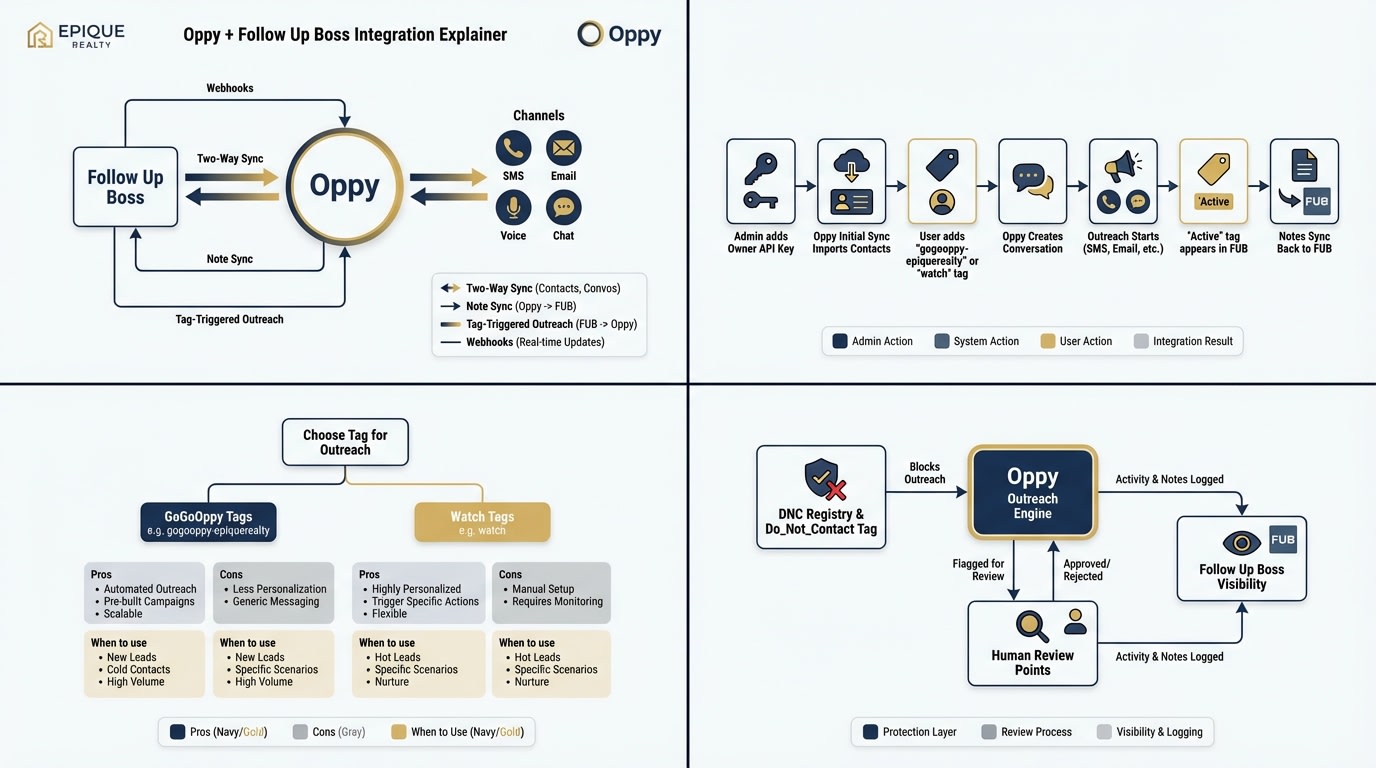
What this image is meant to show
- Follow Up Boss as the operational source,
- Oppy as the orchestration layer,
- communication channels as the engagement layer,
- and sync/trigger logic connecting everything.
Final recommendation
For Epique Realty, the best immediate next move is:
- keep Trey’s API key connection in place,
- validate one end-to-end trigger using a test contact,
- start with a simple tag-driven workflow,
- then expand once the team is comfortable with the visibility and controls.
If you want, the next version of this document can be expanded into a true Epique implementation blueprint with:
- exact tag naming recommendations,
- trigger-by-trigger SOPs,
- sample prompts,
- and a brokerage-specific operating diagram.